How to Enter a Meet
Login to SwimTopia website or app; login is found in the upper right corner of the screen.
Under the Meets & Events tab, select "Event Calendar" to signup for a swim meet.
Swimmer Event Signup
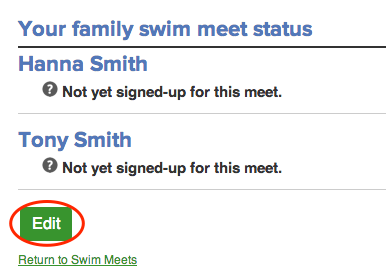
- Click Meets & Events > Event Calendar, then click on the green MEET ENTRY tab, and then click the Edit tab under your athletes' names.
Text Area
Simple formatted text


Image
Upload and embed an image
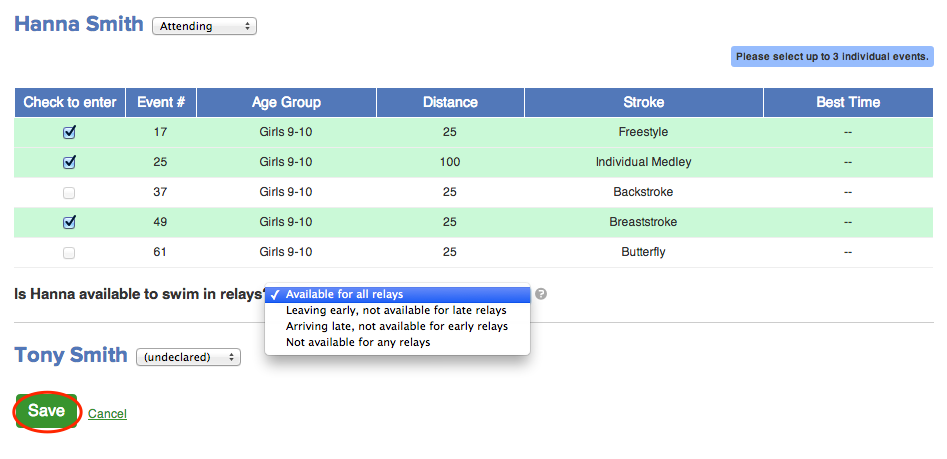
- For each athlete, select an option from the dropdown menu:
- Attending
- Not Attending
It is very important that you declare your swimmer(s), so coaches can complete entries. Swimmers are not required to swim at the meets, but if your swimmer will not attend, please select the second option.
Text Area
Simple formatted text
Image
Upload and embed an image
- Select up to three individual events from the race list.
- If you are unsure about individual events, you may leave events blank, and the coaches will help choose.
- Once you select individual events, please declare relay status from a dropdown menu:
- Available for all relays (can swim in one or both relays)
- Arriving late-not available for early relays (early relay is Medley Relay)
- Leaving early-not available for late relays (late relay is Free Relay)
- Not available for any relays.
- All relays are selected by the coaches. Note: Your swimmer may end up not swimming in a relay, even if you declared that they are available. Additionally, there may not be space in some meets for more than 1-2 relays.
- Click Save to record your choices.
The deadline for signing up for events is generally 2-3 days prior to meet.
Should you have any questions about signing up or need to connect with coaches, email the swim team coordinators at [email protected].
Text Area
Simple formatted text